How to Activate Your eSIM in Laos – Step by Step Guide
Published
Traveling to Laos and planning to use an eSIM? At Internet in Laos, we make it simple. Once you order your eSIM from our shop — plans from $6.90 for 10GB — you’ll receive a QR code by email. The process is quick, and you can even install the eSIM profile before arriving in Laos. Activation happens only when you land.
Here’s how to do it:
Can I activate an eSIM in Laos on my own?
Yes — you can activate an eSIM in Laos entirely on your own. There's no shop to visit, no counter registration and nobody to call. You install the profile, and once your phone connects to the Unitel network inside Laos, your plan turns on automatically. The only steps you handle are scanning the QR code and switching on data roaming; the network does the rest. If you're wondering “can I activate an eSIM on my own without help?”, the answer is yes — our Laos eSIM plans are built to be self-activated.
Step 1: Install Your eSIM Profile
- After your order, you’ll receive a QR code.
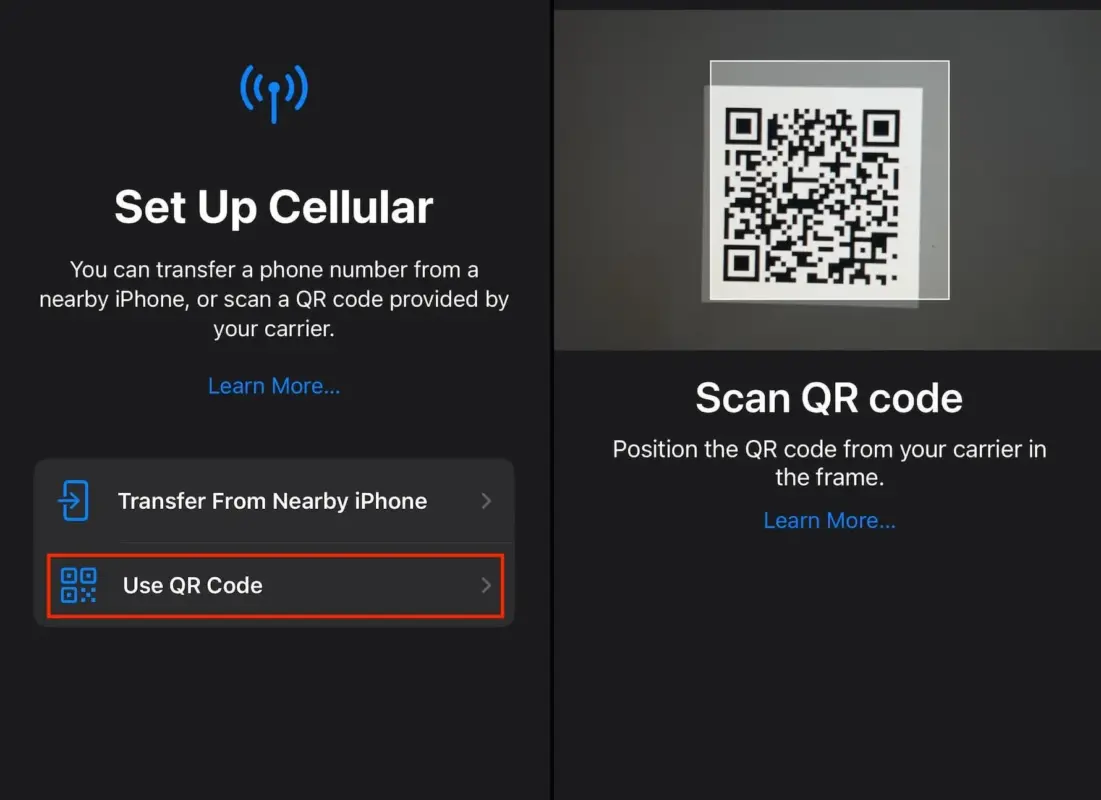
- Open your phone’s Settings → Mobile/Cellular → Add eSIM.
- Scan the QR code.
- Your eSIM profile will now be stored on your device. You can do this from anywhere in the world – no need to wait until you are in Laos.
Step 2: Arrive in Laos
- When you land in Laos, make sure your eSIM line is enabled in your phone’s settings.
- Your device will connect to the local Unitel network.
Step 3: Activation Is Automatic
- There is nothing to dial. The moment your phone connects to the Unitel network after you land, your package activates automatically.
- Important: your package validity starts counting down from that automatic connection (for example, a 7-day package will expire 7 days after your phone first connects to Unitel).
- No IVR, no manual trigger, no in-store registration — just switch on data roaming/mobile data and let your phone connect.
Step 4: Confirm Activation
- To check if your package is active, dial *122#.
- You will receive an SMS with your balance and package details. The message will be in Lao.
Step 5: Translate the SMS (Optional)
- If you don’t read Lao, open Google Lens (built into Google Translate or your camera app on most phones).
- Point it at the SMS to instantly translate the content into English.
Tips for Using Your eSIM in Laos
- You can install the eSIM before traveling — it activates automatically the moment your phone connects to the Unitel network inside Laos.
- Coverage is strong in cities like Vientiane, Luang Prabang, Pakse, and Savannakhet. Rural areas also have good 4G coverage thanks to Unitel’s wide network.
- Prefer a physical SIM instead? See our guide to registering and activating a Unitel SIM card.
- Not sure whether a SIM or an eSIM suits your trip? The Lao Hub's Laos SIM vs eSIM guide compares the options.
- Running low on data mid-trip? See our guide to topping up and checking your Unitel balance.
Haven’t ordered yet? Browse our Laos eSIM plans — all four Unitel packages are back in stock, from 10 to 30 days. See our 2025 Laos SIM card & eSIM price guide for the full price breakdown.
Get connected for your trip
10GB
- 10GB high-speed data
- Automatic activation
Automatic. Data works the moment the eSIM connects to Unitel. Nothing to dial, nothing to switch on.
QR emailed within minutes · Stripe secure checkout · No account needed
15GB
- 15GB high-speed data
- Automatic activation
Automatic. Data works the moment the eSIM connects to Unitel. Nothing to dial, nothing to switch on.
QR emailed within minutes · Stripe secure checkout · No account needed
20GB
- 20GB high-speed data
- Automatic activation
Automatic. Data works the moment the eSIM connects to Unitel. Nothing to dial, nothing to switch on.
QR emailed within minutes · Stripe secure checkout · No account needed